
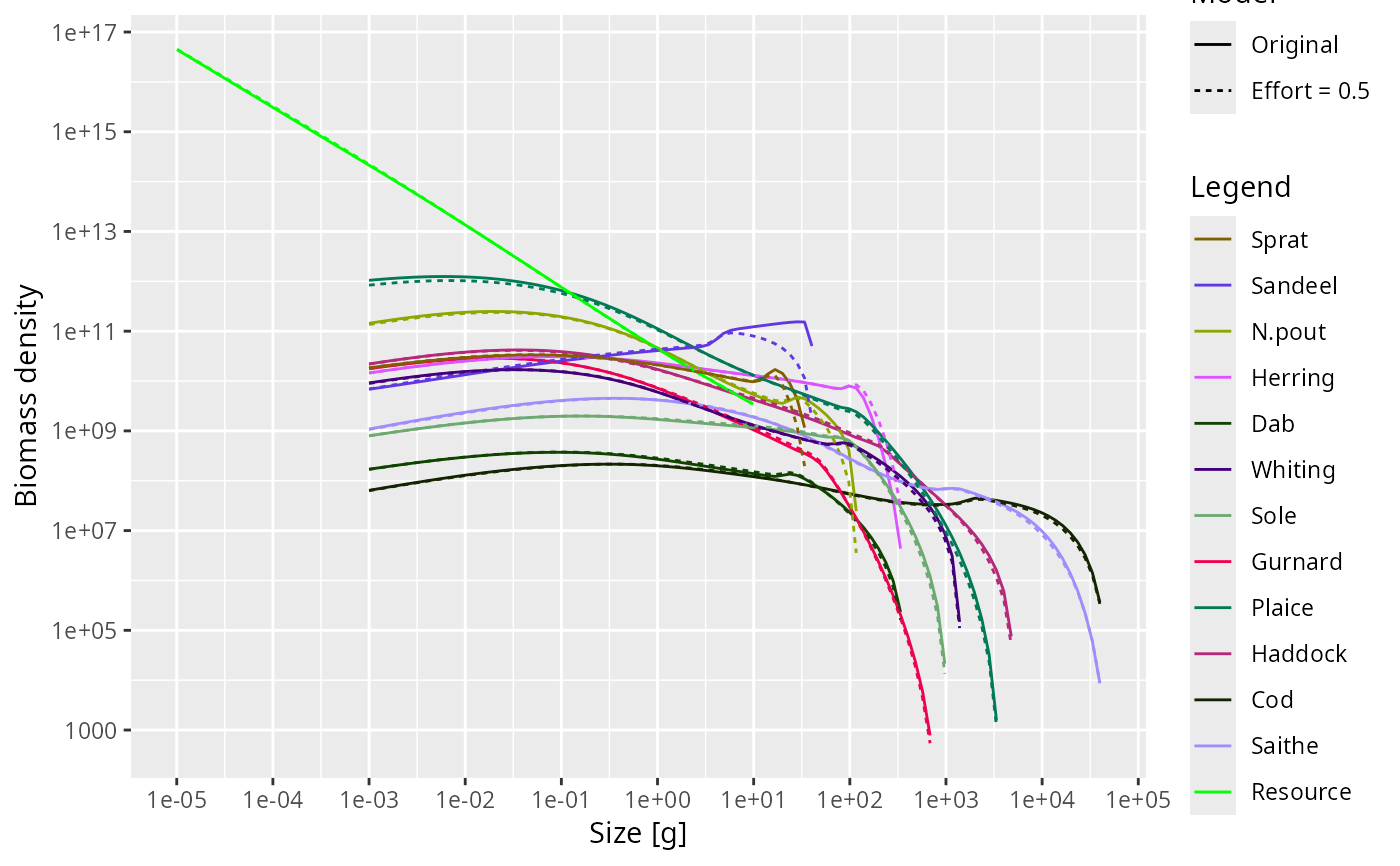
plotSpectra2() compares the abundance spectra from two MizerParams or
MizerSim objects in a single plot. Colours identify species or groups and
linetype identifies the object.
Usage
plotSpectra2(
  object1,
  object2,
  name1 = "First",
  name2 = "Second",
  species = NULL,
  wlim = c(NA, NA),
  llim = c(NA, NA),
  ylim = c(NA, NA),
  power = NULL,
  biomass = NULL,
  per_log_size = NULL,
  total = FALSE,
  resource = TRUE,
  background = TRUE,
  highlight = NULL,
  log_x = TRUE,
  log_y = TRUE,
  log = NULL,
  size_axis = c("w", "l"),
  ...
)
Arguments
- object1
First
MizerParamsorMizerSimobject.- object2
Second
MizerParamsorMizerSimobject.- name1, name2
Labels for the two objects, used in the linetype legend.
- species
The species to be selected. Optional. By default all target species are selected. A vector of species names, or a numeric vector with the species indices, or a logical vector indicating for each species whether it is to be selected (TRUE) or not.
- wlim
A numeric vector of length two providing lower and upper limits for the w axis. Use NA for the default: the lower default is
min(params@w) / 100whenresource = TRUE(to show some resource below the fish grid) ormin(params@w)whenresource = FALSE; the upper default ismax(params@w_full). Data is filtered to this range and the axis limits are set accordingly.- llim
A numeric vector of length two providing lower and upper limits for the length axis when
size_axis = "l". UseNAto auto-scale to the data range. Data is filtered to this range and the axis limits are set accordingly.- ylim
A numeric vector of length two providing lower and upper limits for the y axis. Use NA to auto-scale to the data range. Values below 1e-20 are always filtered out from the data regardless of
ylim[1]. Data aboveylim[2]is filtered and the upper axis limit is set accordingly.- power
The abundance is plotted as the number density times the weight raised to
power. An alternative to thebiomassandper_log_sizearguments, with which it must agree if they are given as well; see Details. The default ispower = 1, the biomass density.- biomass
Whether to plot the biomass density (
TRUE, the default) or the number density (FALSE).- per_log_size
Whether to plot the density with respect to logarithmic size (
TRUE) or with respect to size (FALSE, the default).- total
A boolean value that determines whether the total is plotted as well. The total is the total of everything the object holds — every species and the resource — whatever is drawn, so it does not move when
species,resourceorbackgroundchange. Default is FALSE.- resource
A boolean value that determines whether resource is included. Default is TRUE.
- background
A boolean value that determines whether background species are included. Ignored if the model does not contain background species. Default is TRUE.
- highlight
Name or vector of names of the species to be highlighted by being plotted with thicker lines.
- log_x
If
TRUE(default), use a log10 x-axis.- log_y
If
TRUE(default), use a log10 y-axis.- log
Character string specifying which axes should use log10 scales, in the same form as the base
plot()argument. For example,"x","y","xy"or"". If supplied, this overrideslog_xandlog_y.- size_axis
Whether to plot size as weight (
"w", default) or length ("l"), using the allometric weight-length relationship. Spectrum densities and their units are transformed to match the chosen axis.- ...
Additional arguments passed to
plotSpectra()for preparing the spectra data, for exampletime_rangeorgeometric_meanforMizerSimobjects.
See also
plotting_functions, plotSpectra(), plotSpectraRelative()
Other plotting functions:
addPlot(),
animate(),
plot,
plot2(),
plotBiomass(),
plotCDF(),
plotCDF2(),
plotDiet(),
plotFMort(),
plotFeedingLevel(),
plotGrowthCurves(),
plotMizerParams,
plotMizerSim,
plotPredMort(),
plotRelative(),
plotSpectra(),
plotSpectraRelative(),
plotYield(),
plotYieldGear(),
plotYieldVsF(),
plotting_functions
Examples
# \donttest{
sim1 <- project(NS_params, t_max = 10, progress_bar = FALSE)
#> ℹ No `a` column so using a = 0.01 in w = a l^b, with w in g and l in cm.
#> ℹ No `b` column so using the isometric default b = 3 in w = a l^b.
sim2 <- project(NS_params, effort = 0.5, t_max = 10, progress_bar = FALSE)
#> ℹ No `a` column so using a = 0.01 in w = a l^b, with w in g and l in cm.
#> ℹ No `b` column so using the isometric default b = 3 in w = a l^b.
plotSpectra2(sim1, sim2, "Original", "Effort = 0.5")
 # }
# }