
Compare cumulative abundance or biomass distributions from two objects
Source:R/plots.R
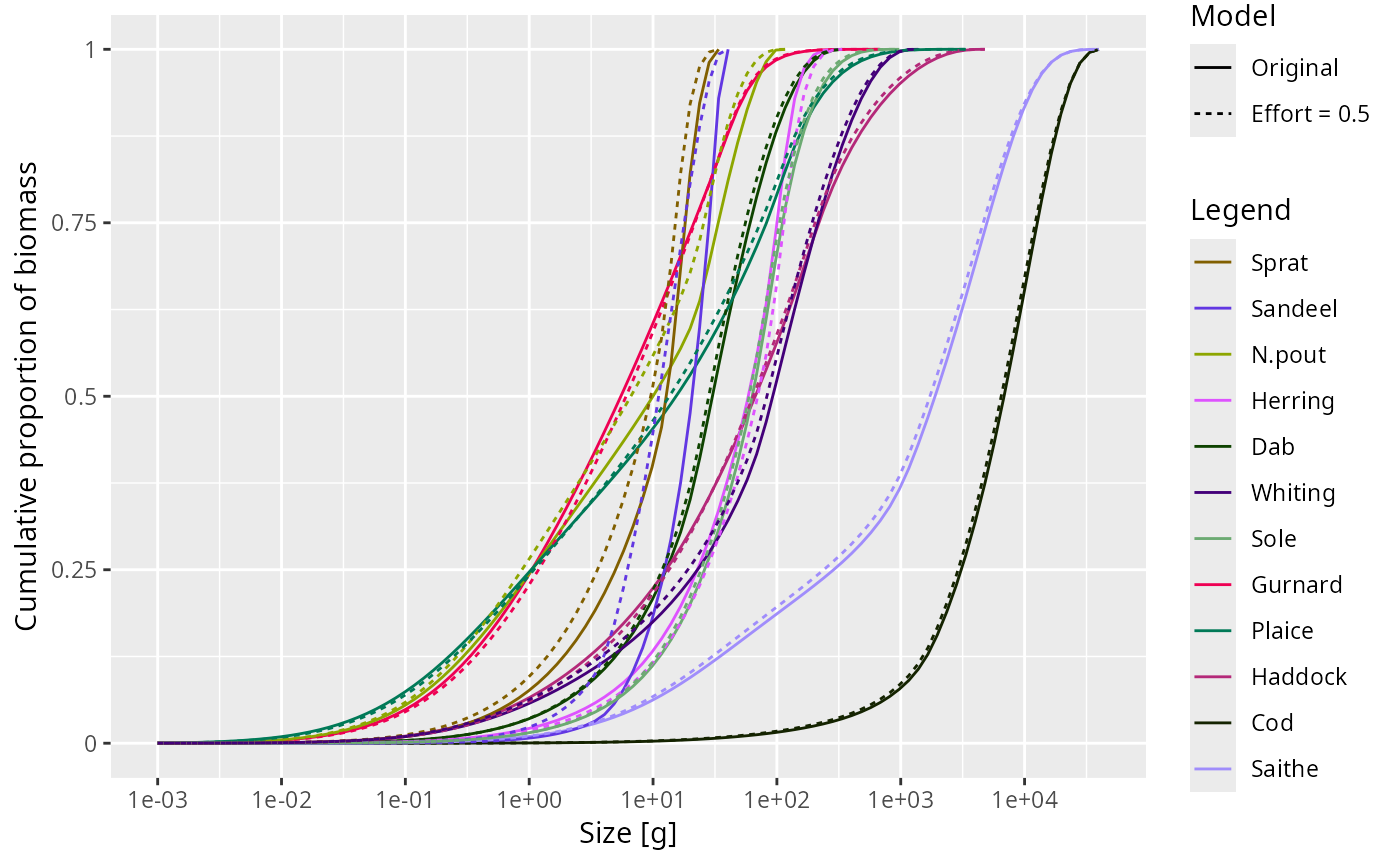
plotCDF2.RdplotCDF2() compares cumulative distributions from two MizerParams or
MizerSim objects in a single plot. Colours identify species or groups and
linetype identifies the object.
Usage
plotCDF2(
  object1,
  object2,
  name1 = "First",
  name2 = "Second",
  species = NULL,
  wlim = c(NA, NA),
  llim = c(NA, NA),
  ylim = c(NA, NA),
  power = NULL,
  biomass = NULL,
  per_log_size = NULL,
  total = FALSE,
  resource = FALSE,
  background = TRUE,
  highlight = NULL,
  normalise = TRUE,
  log_x = TRUE,
  log_y = FALSE,
  log = NULL,
  size_axis = c("w", "l"),
  ...
)
Arguments
- object1
First
MizerParamsorMizerSimobject.- object2
Second
MizerParamsorMizerSimobject.- name1, name2
Labels for the two objects, used in the linetype legend.
- species
The species to be selected. Optional. By default all target species are selected. A vector of species names, or a numeric vector with the species indices, or a logical vector indicating for each species whether it is to be selected (TRUE) or not.
- wlim
A numeric vector of length two providing lower and upper limits for the w axis. Use NA for the default: the lower default is
min(params@w) / 100whenresource = TRUE(to show some resource below the fish grid) ormin(params@w)whenresource = FALSE; the upper default ismax(params@w_full). Data is filtered to this range and the axis limits are set accordingly.- llim
A numeric vector of length two providing lower and upper limits for the length axis when
size_axis = "l". UseNAto auto-scale to the data range. Data is filtered to this range and the axis limits are set accordingly.- ylim
A numeric vector of length two providing lower and upper limits for the y axis. Use NA to auto-scale to the data range. Values below 1e-20 are always filtered out from the data regardless of
ylim[1]. Data aboveylim[2]is filtered and the upper axis limit is set accordingly.- power
The number density is multiplied by the weight raised to
powerbefore being integrated. An alternative to thebiomassargument, with which it must agree if that is given as well. The default ispower = 1, the cumulative biomass.- biomass
Whether to plot the cumulative biomass (
TRUE, the default) or the cumulative abundance (FALSE).- per_log_size
Only
FALSE(the default) is accepted; see Details.- total
A boolean value that determines whether the total is plotted as well. The total is the total of everything the object holds — every species and the resource — whatever is drawn, so it does not move when
species,resourceorbackgroundchange. Default is FALSE.- resource
A boolean value that determines whether resource is included. Default is FALSE.
- background
A boolean value that determines whether background species are included. Ignored if the model does not contain background species. Default is TRUE.
- highlight
Name or vector of names of the species to be highlighted by being plotted with thicker lines.
- normalise
If
TRUE(default), plot the cumulative proportion. IfFALSE, plot the cumulative abundance, biomass, or other unnormalised integral.- log_x
If
TRUE(default), use a log10 x-axis.- log_y
If
TRUE, use a log10 y-axis. Default isFALSE.- log
Character string specifying which axes should use a log10 scale, in the same form as the base
plot()argument. If supplied, this overrideslog_xandlog_y.- size_axis
Whether to plot size as weight (
"w", default) or length ("l"), using the allometric weight-length relationship.- ...
Additional arguments passed to
plotCDF()for preparing the cumulative distribution data, for exampletime_rangeorgeometric_meanforMizerSimobjects.
See also
Other plotting functions:
addPlot(),
animate(),
plot,
plot2(),
plotBiomass(),
plotCDF(),
plotDiet(),
plotFMort(),
plotFeedingLevel(),
plotGrowthCurves(),
plotMizerParams,
plotMizerSim,
plotPredMort(),
plotRelative(),
plotSpectra(),
plotSpectra2(),
plotSpectraRelative(),
plotYield(),
plotYieldGear(),
plotYieldVsF(),
plotting_functions
Examples
# \donttest{
sim1 <- project(NS_params, t_max = 10, progress_bar = FALSE)
#> ℹ No `a` column so using a = 0.01 in w = a l^b, with w in g and l in cm.
#> ℹ No `b` column so using the isometric default b = 3 in w = a l^b.
sim2 <- project(NS_params, effort = 0.5, t_max = 10, progress_bar = FALSE)
#> ℹ No `a` column so using a = 0.01 in w = a l^b, with w in g and l in cm.
#> ℹ No `b` column so using the isometric default b = 3 in w = a l^b.
plotCDF2(sim1, sim2, "Original", "Effort = 0.5")
 # }
# }